
Axial fan calculation: sizing for ventilation and air handling
Calculating an axial fan means sizing its diameter, blade count, rotation speed, hub diameter and blade twist so that it delivers the required flow rate and the pressure change that makes up for the pressure losses of the system. This page deals with designing a fan for a wind tunnel or an air-handling ventilation system. We explain in four models what happens in a fan that creates a pressure delta at a given flow rate, then how the Heliciel wizard builds on them.
Contents:
- Axial fan pressure delta: definition and formula
- Induced velocities, sections and flow conservation
- Axial fan design wizard (Fan Wizard)
- Theoretical blade layout: fan velocity triangles
- Fan and pressure losses: open and closed systems
- Fan installation: inlet, distances and tip clearance
1: Axial fan pressure delta: definition and formula
The total pressure delta of an axial fan (Dpt, in pascals) is the difference between the total pressure at the suction flange (PtAsp) and the total pressure at the discharge flange (PtRef). Total pressure is the sum of static pressure and dynamic pressure.
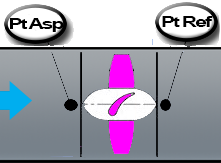
The two measuring points: PtAsp upstream of the propeller, PtRef downstream. Their difference is the pressure delta the fan must deliver.
This pressure difference is the axial thrust force P (in newtons) created by the propeller, divided by the area S (in m²) of the annulus swept by the blades:
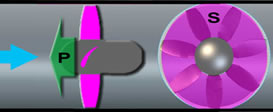
Dpt = P / S: the thrust P acts on the annulus of area S swept by the blades (the hub is excluded).
The thrust P comes from the change in momentum between upstream and downstream of the blades. For an incompressible fluid, it equals P = ρ·Q·(V2 − V0), where ρ is the density, Q the flow rate, V0 the upstream velocity and V2 the downstream velocity. The fluid is thus accelerated from V0 upstream to V2 downstream, through the velocity V1 at the blades. The energy of this acceleration (the axial induced velocity) comes from the lift of the blades, which the motor drives in rotation.
2: Induced velocities, sections and flow conservation
Let S0, S1 and S2 be the sections of the stream upstream, at the blades and downstream, and V0, V1 and V2 the corresponding velocities. The induced velocity is added in two steps: it raises V0 to V1 at the blades, then V1 to V2 in the wake.
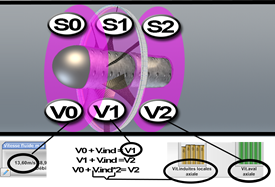
The three sections and three velocities of the model: V0 upstream, V1 at the blades, V2 downstream. The relations V0 + Vind = V1 and V1 + Vind = V2 are written under the sketch.
The flow rate Q is the same everywhere, since the fluid is incompressible. The continuity equation is therefore Q = S0·V0 = S1·V1 = S2·V2. Since V0 < V1 < V2, we have S0 > S1 > S2: the stream contracts as it passes the fan. To limit turbulence losses, the hub and the duct are sized to match S0, S1 and S2 to the velocity changes. The widening S3 then brings the velocity back down to V3 = V0 and turns dynamic pressure into static pressure (see the Bernoulli relation).
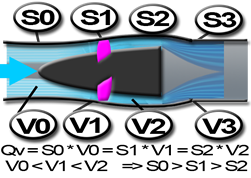
Q = S0·V0 = S1·V1 = S2·V2, with V0 < V1 < V2 hence S0 > S1 > S2; the widening S3 brings the velocity back to V3 = V0.
When V0 = V3, the total pressure delta equals the static pressure delta: Dpt = PtRef − PtAsp = Thrust (N) ÷ Section S1 (m²).
3: Axial fan design wizard (Fan Wizard)
Heliciel includes a "ventilation Wizard" that makes it easier to design helical axial-flow fans to an air-handling specification. You enter the flow rate of the system, you adjust the pressure you want, and Heliciel creates a made-to-measure fan and produces its operating curves (efficiency, total pressure delta) against flow rate.
The Fan Wizard opens from the File menu. Its window is organised in five tabs: Fan parameters, Theoretical layout, Principle, Role of the fan and Installation (in the French interface: Paramètres du ventilateur, Épure théorique, Principe, Rôle du ventilateur, Implantation).
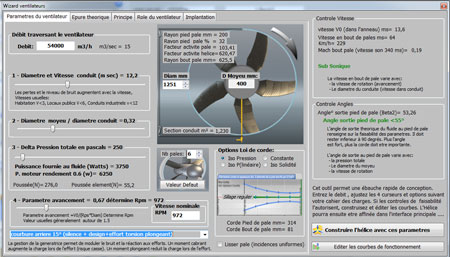
The "Fan parameters" tab of the Wizard: on the left, the sliders for flow rate, diameter, pressure delta and advance ratio; on the right, the resulting velocities and angles. This example is for a flow rate of 45,000 m³/h.
We designed this Wizard at the request of air-handling design offices and ventilation designers, so that they can master the whole design of their systems on their own. Its ambition is to improve the energy efficiency of air-handling installations and to lower running costs, by giving technicians, draughtsmen and project engineers a tool that is easy to pick up and matches the specifications of air handling.
4: Theoretical blade layout: fan velocity triangles
The approach works by a feasibility study of the velocity triangles, according to the pressures and flow rates requested. It lets you pre-size the blades before creating the final 3D model. The theoretical layout, updated automatically by Heliciel, shows the fluid inlet and outlet angles at different radii of the blade. These angles are set by the velocity triangles at the inlet (points 1) and the outlet (points 2) of the profiles.
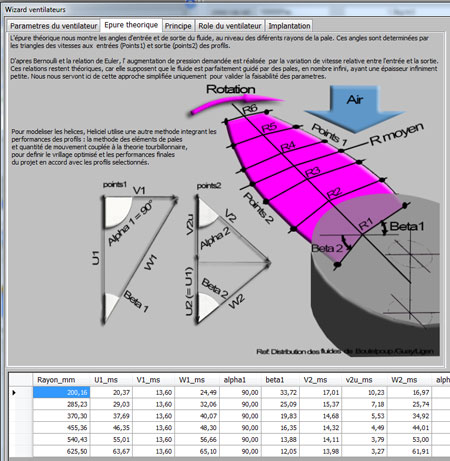
The "Theoretical layout" tab of the Wizard: the velocity triangles at the inlet (points 1) and the outlet (points 2), the angles Beta1 and Beta2, and at the bottom a table that gives, for each blade radius, the velocities U, V and W and the angles.
According to Bernoulli and the Euler relation, the pressure increase requested is achieved by the change in relative velocity between inlet and outlet. These relations remain theoretical, because they assume the fluid is perfectly guided by an infinite number of blades of infinitely small thickness. We use this simplified approach only to check that the parameters are feasible.
To model the propeller, Heliciel uses another method, which includes the performance of the profiles: the BEM (Blade Element Momentum) method, coupled with vortex theory. It defines the optimised twist and the final performance of the project, in line with the profiles you have selected. For details, see the blade element and momentum theory.
5: Fan and pressure losses: open and closed systems
The fan provides the "Dpt" (total pressure delta, static plus dynamic) equal to the total pressure the flow consumes at the given flow rate. Here are four examples made with Mecaflux Pro3D, at the same flow rate and for the same fan diameter.
Open systems. At the required flow rate, the fan must provide a Dpt equal to the singular and regular pressure losses, plus the dynamic pressure at the outlet if it is not already counted in the singular losses.
Example 1: the system discharges the fluid at high speed, and the dynamic pressure lost is large.
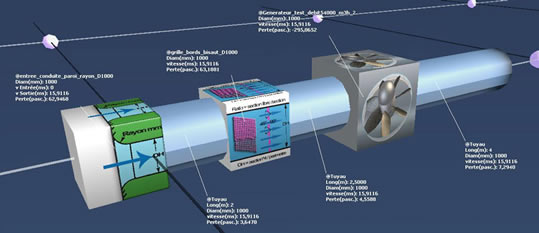
Open circuit, outlet at the duct diameter: the outlet velocity stays high (about 15.9 m/s in a 1,000 mm duct) and all the dynamic pressure is lost.
Example 2: the system discharges the fluid at low speed, and the dynamic pressure lost is small.
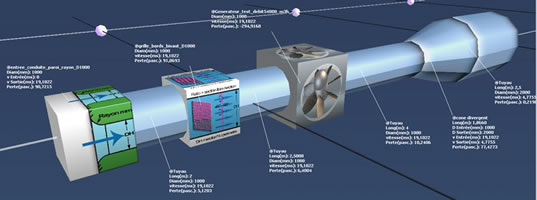
The same circuit with a diverging cone at the outlet: the discharge velocity drops, and so does the dynamic pressure lost.
Closed systems. At the required flow rate, the fan must provide a total pressure delta equal to the singular and regular pressure losses. The outlet dynamic pressure is recovered at the inlet.
Example 3: high-speed return loop (small sections). The dynamic pressure lost is zero, but the pressure losses are large.
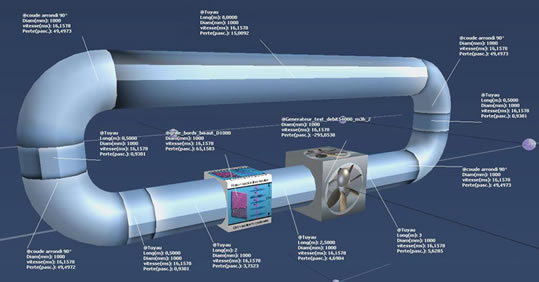
Closed loop with a small section: the elbows and the straight runs add up to high pressure losses.
Example 4: low-speed return loop (large sections). The dynamic pressure lost is zero and the pressure losses are small.
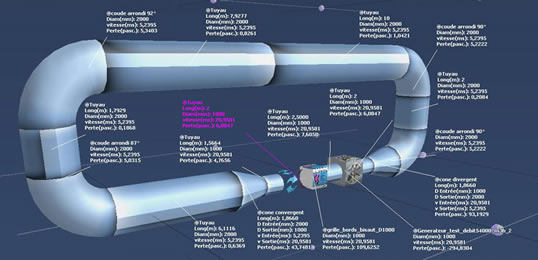
Closed loop with a large section: the velocities in the loop are lower, so the pressure losses are too. The smaller-diameter fan is connected by two cones.
These four cases show that, at equal flow rate and fan diameter, the pressure delta to provide depends entirely on the network. To calculate the pressure losses of a network, we can use the regular pressure loss calculation.
6: Fan installation: inlet, distances and tip clearance
A few installation recommendations avoid performance losses.
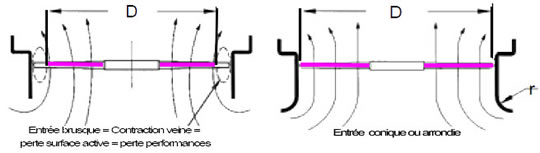
On the left, an abrupt inlet: the stream contracts and the active area shrinks. On the right, a conical or rounded inlet: the air enters without contraction.
- Abrupt inlet: it adds pressure losses and contracts the stream. The active area shrinks, and so does the performance.
- Conical or rounded inlet: the inlet loss is small and the whole active area of the fan is used.
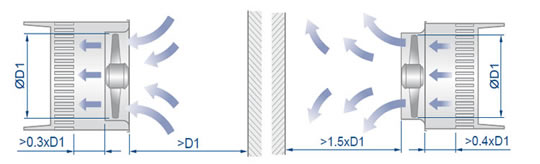
Minimum distances to keep between the rotor, the walls, the heat exchangers and the air inlets or outlets. They are expressed as a fraction of the fan diameter D1: on the figure, 0.3·D1, D1, 1.5·D1 and 0.4·D1.
The distances between the rotor and the heat exchangers, and between the rotor and the inlets or outlets of the system, are chosen according to the fan diameter.
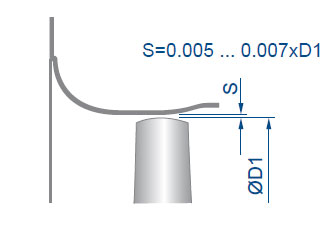
The gap S between the duct and the blade tip: the figure gives 0.005 to 0.007 times the diameter D1.
This gap between the duct and the blade tip matters a lot, because it lets pressure leak from the pressure side to the suction side. The tighter it is, the less pressure the propeller loses.
To go further, we can see the economic stakes of efficiency in the page on calculating and modelling ventilation, air-conditioning and wind-tunnel fans, or export the modelled pump or fan to a network with the function modelling a propeller pump or fan. The neighbouring case of liquids is covered in the page on axial pumps and waterjets.
 Global site map
 Mecaflux
 Tutorials Mecaflux Pro3D
 Tutorials Heliciel
 Tutorials Heliciel PRO CFD
 Mecaflux Store
 Compare software functions
 Quotes, Orders, Payment Methods
 project technical studies